
FoodLog: IBS & FODMAP Tracker
LogFor.LifeFood & Drink
4.337.00 Reviews
- Version
- 6.3.0
- Installs
- 50.00K
- Age Rating
- Everyone
Screenshots
Our Review of FoodLog: IBS & FODMAP Tracker
 Analysis by Appyee
When digestive symptoms are unpredictable, memory can turn into a poor record keeper. I might remember that lunch felt uncomfortable but forget what I ate, how much time passed, or whether the same thing happened on another day. That is the problem a food-and-symptom diary is meant to solve, and it is why I find FoodLog: IBS & FODMAP Tracker most useful as a tool for noticing patterns rather than as a judge of what I should eat.
FoodLog is a free Food & Drink app from LogFor.Life, with optional in-app purchases ranging from $2.99 to $64.99 per item. It is rated for Everyone, has a 4.2 average from around 444 ratings, and has passed 50,000 installs. The release date is July 1, 2023, and the current version is 6.1.2, which requires Android 8.0 or later. Those details make it easy to place the app, but the more important question is whether its logging routine fits your real life.
Building a Useful FoodLog Routine
I find the best FoodLog routine is one I can keep on an ordinary, busy day, not just when I’m feeling motivated to document everything. I’d begin with a short note after meals and add a symptom entry when there’s something meaningful to record; that keeps the log useful without letting it take over. Once that baseline feels steady, checking the settings can help make the habit fit the questions I actually want to explore.
Start with a baseline, not a perfect diary
The most practical way to begin is to record meals and symptoms as they happen, without trying to make every entry exhaustive. A few consistent details can be more useful than a beautifully detailed log that becomes too much work to maintain. I would start by choosing the symptoms I actually want to watch and noting meals in a way I can repeat, then adjust the habit once I know what feels manageable.
That restraint matters because digestive patterns are not always straightforward. A symptom may follow a meal, but timing alone does not prove that meal caused it. Stress, routine changes, and other parts of a day can muddy the picture. I treat any pattern the app surfaces as a question worth investigating, not a diagnosis or an instruction to cut out a food.
Keep entries specific enough to compare
When I log the same meal in different ways, later comparisons become less useful. “Lunch” tells me little; a brief note that distinguishes the main ingredients or a meaningful change gives me something I can recognize next time. I would not turn logging into calorie counting or a food-policing exercise. The goal here is to connect what I ate with how I felt, so the details worth capturing are the ones that help make that comparison.
There is also a useful trade-off between speed and precision. Manually entering a meal can take longer, but it may better reflect a mixed dish than selecting a broad food label. Searching for a common ingredient is quicker, though it may not describe a recipe, portion, or preparation accurately. If I ate something homemade, I would rather write a short, repeatable description than pretend a general database entry captures every ingredient.
Use settings to protect consistency
Before relying on the diary, I would check which dietary preferences and symptoms I selected during setup and make sure they still fit what I am tracking. A profile should support the question I have, not lock me into a label or a particular eating plan. If I am monitoring one symptom, recording a long list of unrelated details can make the routine harder without making the answer clearer.
Reminders are most helpful when they fit a natural pause in the day. I would choose a time when I can realistically make a quick note rather than setting prompts for every meal and then ignoring them. The best reminder is the one that catches a missed entry without making the app feel like another obligation. If my schedule changes, adjusting the habit is better than blaming myself for an imperfect record.
Read patterns with care
The app’s charts and insights can help make repeated experiences easier to see, especially when I have logged consistently. I would compare like with like: similar meals, similar symptom notes, and a sensible stretch of ordinary days, rather than drawing a conclusion from one uncomfortable afternoon. This makes the log more useful in a conversation with a clinician, too, because I can describe a recurring observation instead of presenting a single coincidence as proof.
FoodLog can help organize personal observations, but it cannot establish a medical cause or replace professional advice. That distinction is important during a low-FODMAP process, where food choices and reintroduction need careful handling. I would use the record to prepare better questions for a healthcare professional, not to make increasingly restrictive decisions on my own.
Make the log work in everyday life
A realistic routine might look like this: I eat a quick lunch between errands, make a short meal entry while the ingredients are still easy to remember, and later add a symptom if one appears. At the end of several days, I look for something that repeats instead of reacting to every entry. If a pattern seems worth discussing, the export option can help me bring the record to a healthcare appointment rather than trying to reconstruct it from memory.
That workflow also shows where the app may not suit everyone. If I want a hands-off tracker, detailed nutrition calculations, meal planning, or a broad calorie database, a dedicated nutrition app may be a better fit. If I only need to jot down an occasional symptom, a plain notes app or paper diary may feel faster. FoodLog makes most sense when the connection between meals and gut symptoms is the central question.
When a repeatable habit beats more detail
Experienced users often get more from a simple routine than from filling every field they can find. I would pick a consistent naming style for recurring meals, use the symptom ratings in the same way from one entry to the next, and avoid changing several eating habits at once if I am trying to understand a pattern. These are not hidden tools; they are practical ways to make the records easier to compare.
Another useful habit is to review the log at a set point in the week rather than opening it every time I feel a symptom. A short review can reveal repeated combinations without encouraging me to interpret each entry in isolation. I would keep any note about a possible trigger tentative until it shows up more than once and is sensible to discuss with a professional.
The glossary can be handy during a grocery trip when I need a quick reference, but a quick check should not become a substitute for understanding how a food fits my individual plan. Likewise, community discussions may offer perspective, yet another person’s experience is not evidence that the same food will affect me the same way. I would use the forum and articles as supplementary reading, then keep my own log as the record that matters.
Who will get the most from it
I can see this app helping someone who has been told to observe symptoms, is navigating a FODMAP approach with appropriate guidance, or wants a more organized account before a medical appointment. It is especially suited to a person who is willing to make short, regular entries and who finds it difficult to remember the details of meals after a busy day. The combination of food notes, symptom ratings, trend views, reminders, and export gives that routine a clear purpose.
On the other hand, I would skip it if logging itself is likely to increase food anxiety, if I need clinical interpretation, or if I am looking for a complete nutrition or meal-planning system. A tracking app can make observations visible, but it can also tempt people to search for certainty where the evidence is still messy. In that situation, a simpler diary or guidance from a qualified professional may be the better next step.
What the comparisons really come down to
Compared with a notes app, FoodLog gives the process more structure: symptoms can be rated, food entries can be reviewed alongside them, and trends are easier to scan than a long stream of unformatted notes. A paper diary can be more immediate and less screen-dependent, but it takes more effort to compare entries or prepare a shareable record. General food trackers are often more useful for nutrition totals; this app’s appeal is narrower and more relevant when gut symptoms are the focus.
That focus is both its strength and its limit. A specialized diary can keep attention on the question I care about, but it is not a universal health dashboard. I would not choose it just because I want to record everything about eating. I would choose it when I want a structured way to observe meals and symptoms over time, and I am prepared to interpret those observations cautiously.
Getting Started with FoodLog
So, diving right in, the first thing I did was download the app from the App Store. The installation was pretty smooth, and before I knew it, I was setting up my profile. The app asks for some basic info like your dietary preferences and any symptoms you might want to monitor. It's pretty intuitive, and they guide you through each step, which I really appreciated.
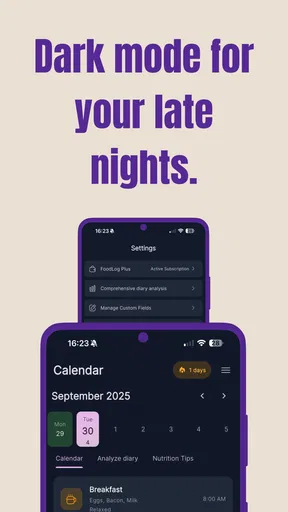
Once everything was set up, I was greeted with a clean and user-friendly interface. It’s not cluttered, which is a relief because, honestly, who wants to deal with a messy app when you're already managing dietary restrictions?
Logging Meals and Symptoms
The heart of FoodLog: IBS & FODMAP Tracker is its meal logging feature. You can either search for common foods or manually enter your meals. There's a comprehensive database that includes a variety of foods along with their FODMAP content. This is super handy because it takes the guesswork out of figuring out what's safe to eat.
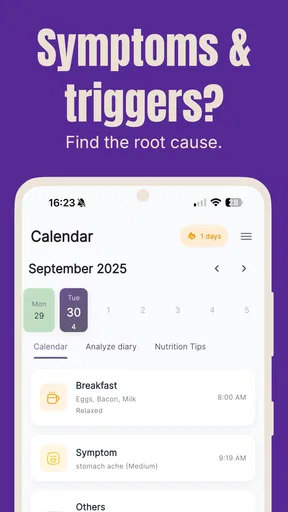
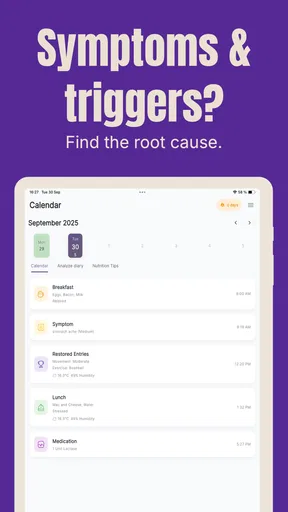
What’s really beneficial is the symptom tracker. After you log a meal, you can also log any symptoms you experience. It’s simple to use; you just rate the severity of symptoms like bloating or pain. Over time, the app compiles this data and provides insights into potential triggers. It’s like having a personal detective for your gut.
Understanding the Insights
Now, this is where the app shines. After a few days of logging, you start getting insights. The app analyzes patterns between your food intake and symptoms, helping you identify possible triggers. This is particularly useful if you're trying an elimination diet. It’s like having a nutritionist in your pocket.
One feature that stood out to me is the trend analysis. You can view your symptom trends over time, which is visualized in neat little charts. This makes it easier to spot any recurring issues or improvements, which is crucial when you're managing IBS.
Staying On Track with Reminders
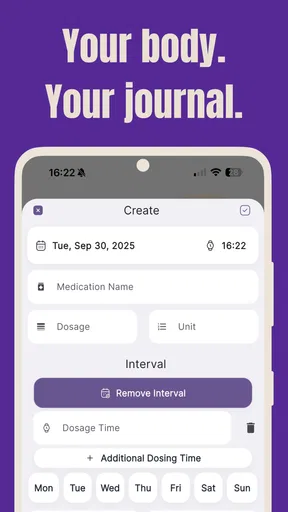
If you're anything like me, life gets busy, and sometimes you forget to log your meals. Luckily, the app has a reminder feature. You can set it up to remind you to log meals or symptoms at certain times of the day. It’s a small feature, but it makes a big difference in ensuring you keep consistent records.
Also, if you're working with a healthcare professional, you can export your logs and share them. This is fantastic because it means you’re not just relying on your memory during appointments. You’ve got detailed logs to back you up.
Additional Features
There’s a nifty glossary of FODMAPs within the app, which is great for quick checks when you're at the grocery store. Plus, they have a community forum where you can connect with other users. Sharing experiences and tips with others in the same boat is invaluable.
The app also includes helpful articles and tips on managing IBS and following a low FODMAP diet. It’s like having a mini library at your fingertips, filled with practical advice and information.
Final Thoughts
Overall, FoodLog: IBS & FODMAP Tracker is a solid companion for anyone managing IBS or following a FODMAP diet. It’s user-friendly, packed with features, and genuinely helpful in understanding your dietary needs. It takes a little commitment to log consistently, but the insights you gain are totally worth it.
If you're struggling to keep track of your meals and symptoms, I’d definitely recommend giving this app a try. It's like having a personal assistant who's always got your back, helping you make sense of your dietary journey. And hey, anything that makes living with IBS just a little bit easier is a win in my book!
Verdict
Strengths of FoodLog: IBS & FODMAP Tracker
- User-friendly interface for easy tracking.
- Comprehensive FODMAP food database.
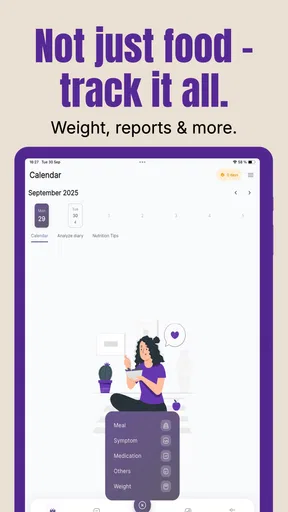
- Customizable meal and symptom logs.
- Insightful analytics for dietary patterns.
- Offline access for uninterrupted tracking.
Limitations of FoodLog: IBS & FODMAP Tracker
- Limited free version features.
- Occasional sync issues with cloud.
- Requires manual data entry.
- No direct integration with fitness apps.
- Some users find the UI outdated.
Similar Picks in This Category
View All
Rappi: Food Delivery, Grocery
Rappi, Inc - Delivery3.5

McDonald’s: Cupons e Delivery
Arcos Dorados4.3

Swiggy: Food Instamart Dineout
Swiggy4.7

Blinkit: Groceries & more
Blinkit4.8

foodpanda: food & groceries
Foodpanda GmbH a subsidiary of Delivery Hero SE4.0

Zomato: Food Delivery & Dining
Zomato4.7
Frequently Asked Questions
What is FoodLog: IBS & FODMAP Tracker and who is it for?
FoodLog: IBS & FODMAP Tracker is a mobile application designed to help individuals manage Irritable Bowel Syndrome (IBS) by tracking their food intake and identifying potential triggers. It is particularly useful for those following a low FODMAP diet. The app is suitable for anyone looking to monitor their symptoms and dietary habits effectively.
How does FoodLog help manage IBS symptoms?
FoodLog assists users in managing IBS symptoms by allowing them to log their meals, track symptoms, and identify potential food triggers. The app provides insights into how different foods affect their digestive health, helping users make informed dietary choices. With customizable features, it supports a personalized approach to managing IBS.
What features does FoodLog offer to enhance user experience?
FoodLog offers a range of features including a comprehensive food diary, symptom tracker, and a database of FODMAP diet information. Users can set reminders, view detailed reports, and access educational resources to better understand their condition. The app’s user-friendly interface ensures an intuitive experience for tracking daily habits and health data.
Is FoodLog suitable for those not following a FODMAP diet?
Yes, while FoodLog is optimized for those on a FODMAP diet, it is also beneficial for anyone looking to track their dietary intake and digestive health. The app’s customizable tracking features allow users to tailor it to their specific dietary needs, regardless of whether they follow a FODMAP diet or not.
Does FoodLog require a subscription or in-app purchases?
FoodLog offers a free version with essential tracking features. However, for access to premium features such as advanced analytics, personalized insights, and additional resources, users may need to subscribe to a paid plan. In-app purchases are optional and designed to enhance the overall functionality and user experience.
